Category Archives: macOS

Installing pyscard with Python 3+ on macOS

In 2020, I did some reading and writing Python code to read NSICCS (National Standard for Indonesia Chip Card Specification) using USB SmartCard Reader Gemalto PC Twin Reader. This was possible using pyscard v1.9.9 with Python 2.7. I just realized that the library was installed on my old MacBook Pro Retina 2012 and has not… Read More: Installing pyscard with Python 3+ on macOS »

Converting A Bash Shell CLI Into An Executable Script on macOS Finder

I was doing a certain task that required me to rename the whole files in the folder with an extension of JPG. Initially, as a person who loves to do tasks using CLI (command line interface), this is an easy task. Find the pattern of the files, that is only three digits of number, then… Read More: Converting A Bash Shell CLI Into An Executable Script on… »

Spicing Up The oh-my-zsh for AWS CLI

I am working with awscli and gcloud a lot. Sometimes I need to know whether I’m currently working on my lecturing account, or my work account. I’m thinking of a good indicator on which profile account and region I’m working right now. And oh-my-zsh already have that, since I installed it last year ?. This post only discuss on how to prepare the oh-my-zsh to have indicator with AWS Profile.

Disassembling Binary File with Python on Mac

I’m currently doing some exploration towards PE32 on my macOS. Some of interesting surface analysis, some of deep analysis. But sometimes, I need only to see what kind of instructions in a small chunk of PE32. It was begin with the this blog, that discussing PE32 using Python pefile module by Ero Carrera. Installing pefile… Read More: Disassembling Binary File with Python on Mac »

Pimping My Shell with oh-my-zsh and Powerlevel10k theme

Realizing that I need more information on my CLI, I decided to pimp my shell more than just colorizing the prompt. I chose zsh and oh-my-zsh. Visit the official Oh-My-ZSH webpage. The installation is pretty much straight forward, simply type this line below on the terminal: sh -c “$(curl -fsSL https://raw.github.com/ohmyzsh/ohmyzsh/master/tools/install.sh)” It will setup the… Read More: Pimping My Shell with oh-my-zsh and Powerlevel10k theme »

Small Tune in macOS

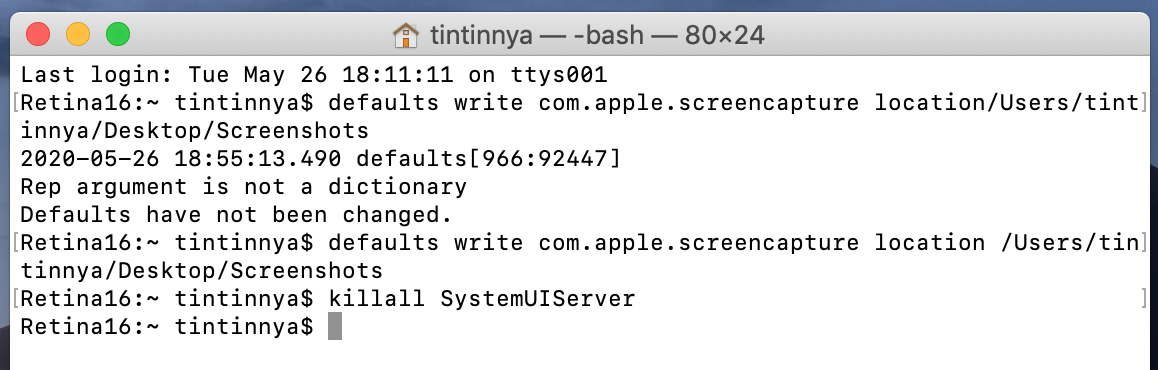
I usually did these steps when having a newly installed macOS. This post also serves as my personal notes on how to do several things such as:1. Changing the terminal appearance with colorful prompt.2. Finder shows hidden folders/files.3. Changing default folder of Screenshot file 1. Changing the terminal appearance with colorful prompt. 2. Finder shows… Read More: Small Tune in macOS »

Make My MBP New Again

I love my old MacBook Pro 15” Retina Display Mid 2012. Old, but still working after 8 years I bought it in 2012. Having this MBP also became my first experience of purchasing an Apple product directly in the Online Apple Store, since I lived in the country where the Official Apple Store does not… Read More: Make My MBP New Again »