

I was wondering whether inside WSL I can install llama.cpp. Here’s the current setup

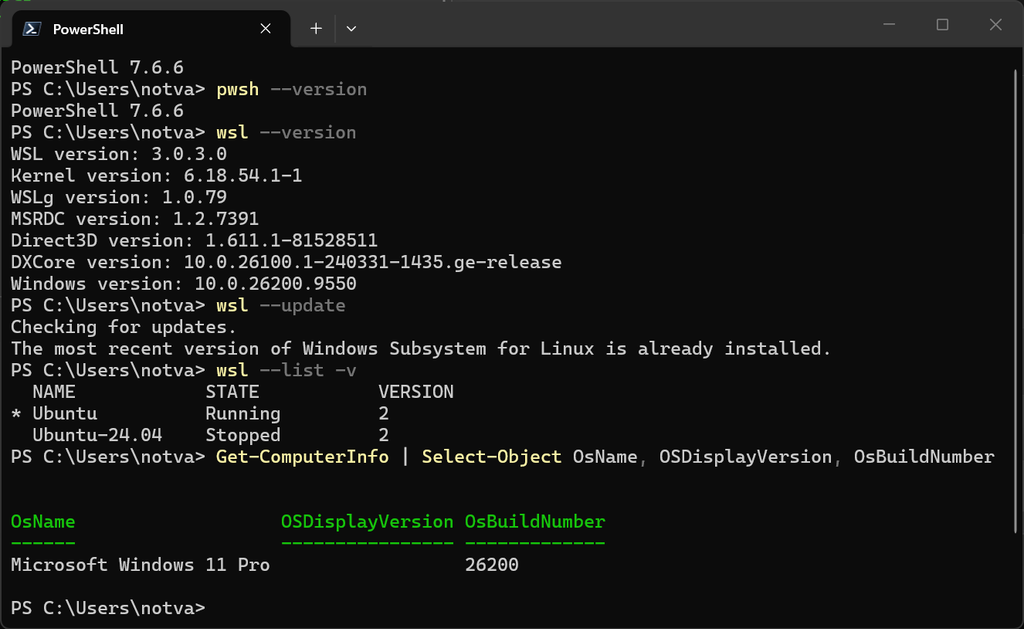
and do the sanity check inside the WSL


The commands above show and confirm the installed OS is Ubuntu 24.04.4 LTS on x86_64 architecture, still have 92 GB of free RAM, and 825 GB of storage. The memory is 92GB because I gave WSL 96GB RAM out of 128 GB total RAM.


This to confirm that the GPU passhtrough and Ubuntu inside WSL can read the NVIDIA GeForce RTX 5090 that is supporting the CUDA compute capability 12.0, which referred to NVIDIA Blackwell architecture with code something like with
GPU Code sm_120 or compute_cap = 12.0
GPU Arch compute_120.


This sm_120 thing brought me a headache earlier, as the old CUDA Toolkit before 12.8 said compute_120 is unsupported.
Check the existing nvcc


It appears that this machine has multiple nvcc.


Since the nvidia-smi output shows the CUDA version is 13.4, I’m going to use this /usr/local/cuda-13.4/bin/nvcc


To make this as default CUDA Toolkit,


Start to Build!
Let’s do the sanity check.
git --version
cmake --version
gcc --version
g++ --version
ninja --version

It appears that I don’t have ninja installed yet. Let’s update the package metadata.


Then I installed these:
sudo apt install \
    build-essential \
    cmake \
    git \
    ninja-build \
    ccache \
    pkg-config \
    libcurl4-openssl-dev
then, check again

Then setup the local workspace


Clone the repo, from official github repository


when compiling the llama.cpp, I found out that no SSL is supported


Done add HTTPS support by installing OpenSSL 3.5.9. Let’s continue.
cmake -S . -B build \
    -G Ninja \
    -DGGML_CUDA=ON \
    -DCMAKE_BUILD_TYPE=Release \
    -DCMAKE_CUDA_ARCHITECTURES=120 \
    -DCMAKE_CUDA_COMPILER=/usr/local/cuda-13.4/bin/nvcc \
    -DOPENSSL_ROOT_DIR=/opt/openssl-3.5.9 \
    -DCMAKE_PREFIX_PATH=/opt/openssl-3.5.9 \
    -DCMAKE_BUILD_RPATH=/opt/openssl-3.5.9/lib

Let’s build it

It seems that the installation read cross platform from WSL to Windows.


segmentation fault? gdb it is.


see the file /lib/x86_64-linux-gnu/libnvidia-ptxjitcompiler.so.1? Let’s observe

then, let’s see the sharedlibrary

Yes. The library /lib/x86_64-linux-gnu/libnvidia-ptxjitcompiler.so.1 is on Windows, while /usr/lib/wsl/drivers/nvmdsi.inf_amd64_05d1e242e80cf105/libnvidia-ptxjitcompiler.so.1 is in WSL.

then test it


then we modify this

Download the model to local


I chose to download it via Chrome from this https://huggingface.co/Qwen/Qwen3-32B-GGUF and then heading to https://huggingface.co/Qwen/Qwen3-32B-GGUF/blob/main/Qwen3-32B-Q4_K_M.gguf , which my computer can be supported up to 5 bit.


but at the time Chrome received the final bytes of the file, it gave me this:


Simply calculate the hash of the file in the Chrome downloaded folder, it matches with the published SHA-256 of the file!


Let’s test it:
 llama-cli \
    -m /mnt/e/GGUF/Qwen3-32B-Q4_K_M.gguf \
    -ngl 99 \
    -c 8192 \
    -n 128 \
    -p "Explain the difference between symmetric and asymmetric cryptography."

Let’s download the GGUF using hf cli then. Install the hf CLI as documented on their official website https://huggingface.co/docs/huggingface_hub/en/guides/cli


I got errors saying that there is Xet problem for hf-xet 1.5.3 or earlier, so check it first with this:
hf --version

~/.hf-cli/venv/bin/python -c \
'import huggingface_hub, hf_xet; print("huggingface_hub:", huggingface_hub.__version__); print("hf_xet:", hf_xet.__version__)'

BONUS: I’m checking whether huggingface.co is PQC-ready 😀
LD_LIBRARY_PATH=/opt/openssl-3.5.9/lib \
SSL_CERT_FILE=/etc/ssl/certs/ca-certificates.crt \
SSL_CERT_DIR=/etc/ssl/certs \
/opt/openssl-3.5.9/bin/openssl \
s_client \
-connect huggingface.co:443 \
-servername huggingface.co \
-brief \
</dev/null

Next model is GLM, but since the z.ai officially not providing the GGUF version, then I visited unsloth https://huggingface.co/unsloth/GLM-4.7-Flash-GGUF and find the Q4_K_M at this url https://huggingface.co/unsloth/GLM-4.7-Flash-GGUF?show_file_info=GLM-4.7-Flash-Q4_K_M.gguf


using hf cli with additional –local-dir parameter


Let’s setup the llama-server to support PQC as well. Check whether the openssl has the correct binary to support PQC, that is OpenSSL 3.5.9. Details to install this, is discussed at this post.

Run the llama-server and test it with curl


and get the sample
curl -sk https://localhost:8443/v1/chat/completions \
  -H "Content-Type: application/json" \
  -d '{
    "model": "local",
    "messages": [
      {
        "role": "user",
        "content": "Why is the sky blue?"
      }
    ]
  }' | jq -r '.choices[0].message.content'

Done.